From a news video to a 3D world model
How twenty frames of a public video tour became metric 3D captures through a world model, and how a Gaussian-splat trainer running on a plain CPU made them photoreal, with the code for each step.
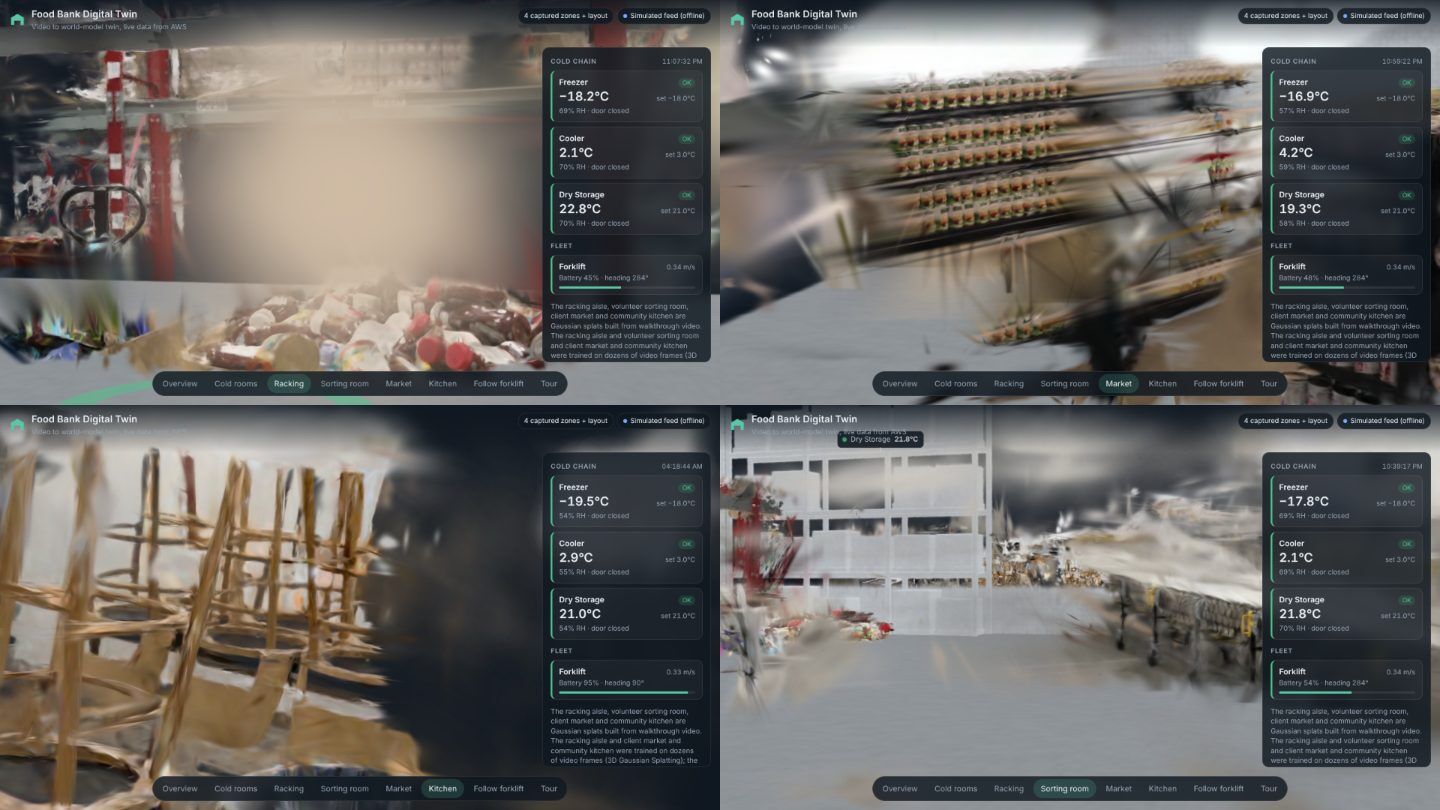
Part 1 was the why. This part is the first step of the pipeline: turning an 18-minute local news tour into 3D captures that sit in real metres. It is also the step where most of the judgment lives, because the video was shot for television, not for reconstruction.
Start by reading the video like a surveyor
A world model needs overlapping views of one space, so the first job is to pick zones, not to process the whole tour. I sampled one frame every ten seconds and scored each stretch of the video for camera movement, people in shot, and surfaces that reconstruct badly.
| Zone | Verdict |
|---|---|
| Pallet-racking aisle | Picked first. The camera moves around a bay and down the aisle, and one stretch has no people at all |
| Volunteer sorting room | Picked. Clean shots, but the camera barely moves |
| Client market | Picked. Good shelves, people block the centre |
| Freezer and cooler doors | Skipped. Blank walls and fog |
| Community kitchen | Trained later. Stainless steel is hard for splats |
The racking aisle is also the zone that matters most for a warehouse twin: inventory locations, forklift paths and temperature zones all live there.
Frames, and why the automatic picker failed
The script keeps the sharpest frame in each time bucket and crops off the broadcast graphics at the bottom of the screen.
scripts/ingest_and_build.sh --video-file tour.mp4 \
    --start 305 --interval 4 --crop-bottom 264 --ingest-only
The obvious way to pick eight inputs from forty is to split the clip into equal segments and take the sharpest frame in each. On interview footage that fails: sharpness rewards in-focus faces, so it picked six nearly identical shots of the two hosts. I chose the inputs by hand for viewpoint spread and fewest people, and masked the hosts out with boxes.
The world model: poses and metric depth for 20 cents
The world model's pose task takes the frames and returns, for each one, where the camera was, a depth map in metres, and a confidence map. It costs 10 credits per image, and 1,000 credits is a dollar. Three zones from 20 frames came to 200 credits.
The depth passed a simple sanity check. The first racking beam lands about 0.4 m above the lens, which is what you would expect on a real beam about 1.9 m off the floor.
The fusion step is local and free. It unprojects every depth map, keeps the most confident sample per 1 cm voxel, and writes the result as Gaussians in both a browser format and OpenUSD.
.venv/bin/python scripts/atlas_twin.py pose
.venv/bin/python scripts/atlas_twin.py fuse
.venv/bin/python scripts/atlas_twin.py site   # place the zones on one plan
Every paid stage writes its operation id to a state file before it waits, and sends an idempotency key derived from the request body, so a re-run resumes instead of paying again. The client also backs off on rate limits and gateway errors, honoring Retry-After:
def req(self, method, path, body=None, *, idem=None, params=None, timeout=120):
    headers = {"Idempotency-Key": idem} if idem else {}
    for attempt in range(6):
        r = self.s.request(method, self.base + path, json=body, params=params,
                           headers=headers, timeout=timeout)
        if r.status_code in (429, 502, 503, 504) and attempt < 5:
            delay = float(r.headers.get("Retry-After") or 2 ** (attempt + 1))
            time.sleep(delay)
            continue
        if r.status_code >= 400:
            raise PipelineError(f"{method} {path}: HTTP {r.status_code}: {r.text[:800]}")
        return r.json() if r.content else {}
A budget guard sits in front of every paid stage. If the estimate for a request is above --max-credits, the script refuses to submit it.
The step I most wanted, generating views of the space the camera never saw, failed twice on the provider's side with no detail. I stopped retrying until I knew whether failed jobs were billed. That is the open problem, and it is why Part 3 exists.
Making it photoreal on a CPU
The fused captures look right from their source cameras and fall apart when you move. So the second route trains a real 3D Gaussian Splatting model per zone from 49 to 72 frames.
The standard trainers rasterize with CUDA kernels, and the machine that builds this repo has no GPU. So scripts/splat_train.py implements the same method in plain PyTorch tensor code: project each Gaussian to the image, composite front to back, and optimize color, shape and opacity against the frames. With sparse rasterization it runs at about one second per step at 480 pixels on four CPU cores.
The heart of it is compositing. Each pixel's color is a sum over the Gaussians that cover it, front to back, each weighted by its own opacity times the transmittance left by everything in front of it. On a GPU that is a loop per pixel. In tensor code it becomes one sorted list of (pixel, Gaussian) pairs and a segmented cumulative sum of log(1 − alpha), so transmittance for every pair comes out of one cumsum:
alpha = (opac[gid] * torch.exp(power.clamp(max=0.0))).clamp(max=0.99)
l1m = torch.log1p(-alpha).double()              # log(1 - alpha), stable for small alpha
cs = torch.cumsum(l1m, 0)                       # running sum across all pairs, sorted by pixel then depth
with torch.no_grad():                           # index of the first pair of each pixel's segment
    seg_first = torch.ones_like(pix, dtype=torch.bool)
    seg_first[1:] = pix[1:] != pix[:-1]
    first_idx = torch.cummax(torch.where(seg_first, torch.arange(pix.numel(), device=dev),
                                         torch.zeros_like(pix)), 0).values
base = (cs - l1m)[first_idx]
trans = torch.exp(cs - l1m - base).float()      # transmittance in front of each pair
w = alpha * trans
img = torch.zeros(H * W, 3, device=dev).index_add(0, pix, w[:, None] * col[gid])
Pairs that would add less than 1/255 alpha are dropped before this step, and each Gaussian only touches pixels inside its visible extent. That is what keeps the work proportional to real coverage instead of image size times splat count.
Two details made the difference on news footage:
- Background plates. The hosts are in nearly every frame. Under their masks, the loss sees pixels warped in from frames up to 15 seconds away, where the hosts had moved on. Without that, the space behind them trains to haze.
- Visual-hull carving. Because the hosts walk with the camera, the space they occupy gets densified into grey columns of splats. Every 250 steps the trainer removes splats that land on a host mask in most of the frames that see them.
for z in racking market kitchen sorting; do
  python scripts/photoreal_twin.py frames --zone $z --video tour.mp4
  python scripts/photoreal_twin.py masks  --zone $z
  python scripts/photoreal_twin.py pose   --zone $z   # COLMAP
  python scripts/photoreal_twin.py train  --zone $z --iters 6000
  python scripts/photoreal_twin.py export --zone $z
done
On a free cloud notebook GPU, the same stages run at full resolution with up to 1.5 million splats.
The output contract
Both routes write the same thing: a splat file for the browser and an OpenUSD file in metres, Y up, with the floor at zero. Nothing downstream needs to know which route made a zone, which is the point.
Part 3: the video never shows the whole building, so how do you model the rest of it? The answer is one Blender script.