A photoreal 3D kitchen in half a megabyte, driven by the simulation
How the kitchen twin renders a realistic kitchen, brigade and garden in the browser with no downloaded models or textures, binds every cook and plate to the simulation, scales from phones to a supersampled Pro Max mode, and exports to OpenUSD for Omniverse.
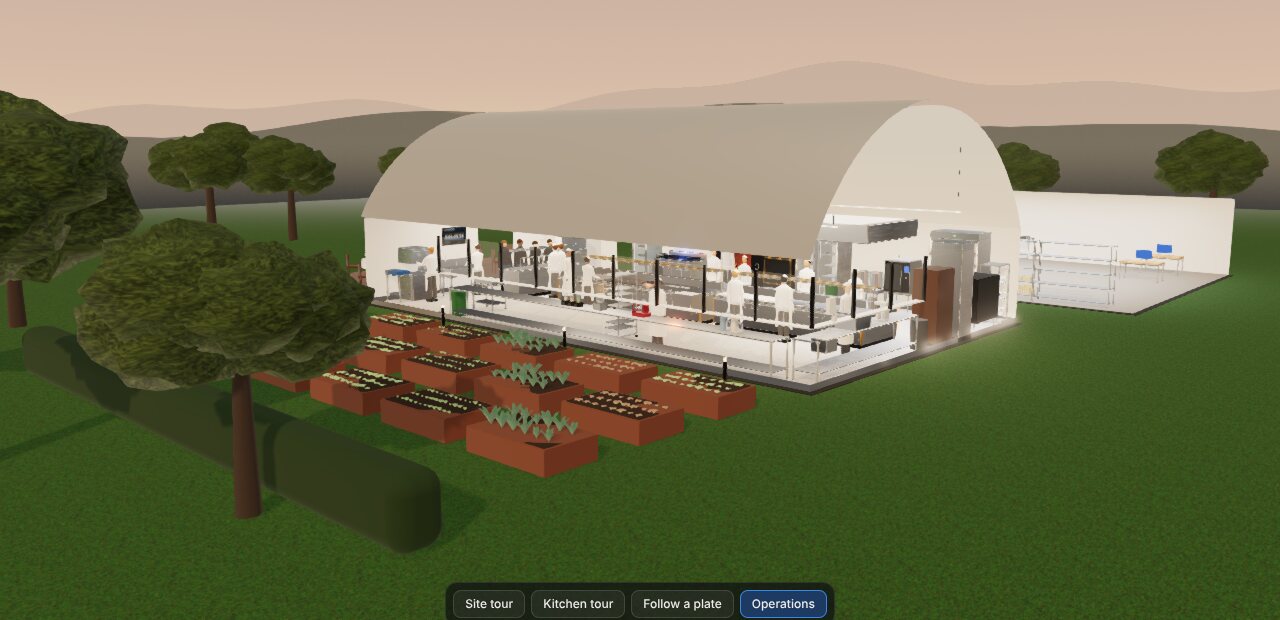
A twin people will not open is not a twin. The product brief said the first ten seconds decide everything: if the opening shot does not look like a real kitchen, and does not move, nothing else gets seen. This part is about meeting that bar on a browser budget.
No assets: generate everything from the data
The usual way to build a realistic 3D scene is to model it in a desktop tool and ship large mesh and texture files. That would have made the first load slow and would have split the scene from the data. Move a range in layout.json and the 3D model would be wrong until someone re-exported it.
Instead, the whole scene is generated from /data at load time. The vaulted kitchen, the annex, the garden, every bench and machine, the cooks and the plates are built in code, with procedural, physically based materials. The production build is about 1.7 MB, roughly 0.5 MB gzipped, against a 25 MB budget in the brief.
The scene uses the data's ids directly. A machine is EQ-*, a station is WC-*, an ingredient is RM-* or INT-*. The simulation, the dashboard and the 3D view never need a mapping table to agree on what they are talking about.
The simulation owns the clock
The 3D view does not animate anything on its own. The simulation owns time, and the scene mirrors its state:
const twin = await createKitchenScene(el, { quality: 'auto' });
const binding = bindSim(twin, sim);                 // src/sim drives it; the sim owns the clock
twin.onFrame((dt) => { sim.tick(dt); binding.update(dt); });
The binding syncs a few times a second. Cooks walk to the station the simulation says they are at, along an A* path on a navigation grid. Machines show what the event log says: preheating, busy, idle or faulted, with flames, steam and LEDs to match. Plates appear when a step finishes, ride with the runner to the table, and disappear when the course is eaten. Stock containers empty as ingredients are drawn. Seeking backward replays the simulation from the start with the same seed, so the scene can jump to any second and be right.
Because every plate is tied to its ticket, you can click one and see its genealogy: which cook made each component, on which machine, and when.
Quality tiers, measured not assumed
Realism costs frame time, so the scene has four tiers:
| Tier | What it does |
|---|---|
| Low | 1× pixels, no MSAA, 2K shadows. The default on phones and software GPUs |
| Medium | Up to 1.5× pixels, MSAA, bloom, 2K shadows |
| High | Up to 2× pixels, ground-truth ambient occlusion, 4K shadows |
| Pro Max | For stills. While the camera rests, jittered frames accumulate into a supersampled image with soft shadows and depth of field |
Auto mode picks a tier from what the browser reports and steps down one level if frames stay under about 28 fps. Stainless steel reflects the kitchen itself, from a reflection probe captured after the scene is built.
Performance is measured, not assumed. A script serves the production build, opens it at each tier in a laptop and a phone viewport, orbits the camera while service plays at 30×, and records time to first frame and frames per second. Run on a GPU-less cloud machine, it gives a worst-case floor. Run on real hardware, it checks the targets.
The Studio: redesign the restaurant, re-run the night
The Studio sits on the same twin. You can change the dining room (table counts and shapes, presets from intimate to private event), the menu (tasting or à la carte, courses, choices, prices), the season, and the light and mood. Every change except lighting recompiles the data, re-runs the whole service headlessly in about 0.1 seconds, and compares the KPIs against the house setup: kitchen close, ticket time, course gap, table wait, guests who walked away, OEE, stockouts, revenue and food cost.
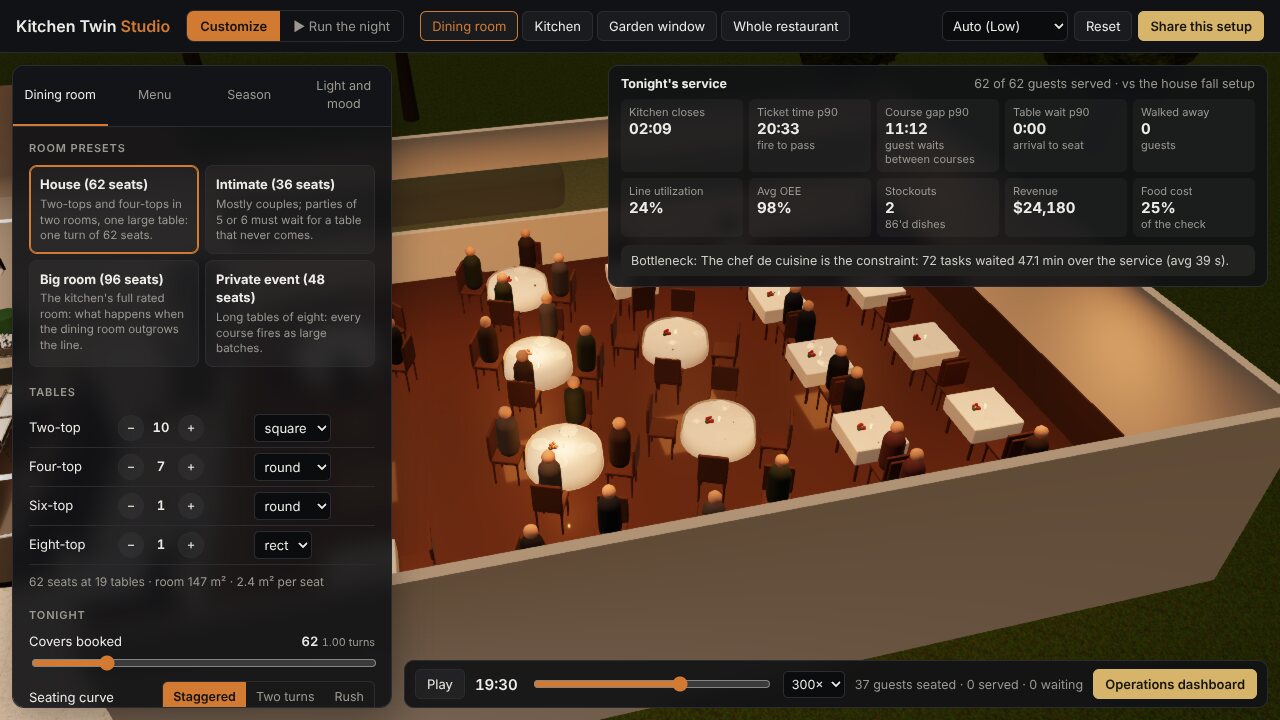
Seasons do real work. An out-of-season dish swaps for that season's dish in the same place on the menu, produce is repriced and delivered short, and the sun moves. Sun position uses the NOAA solar-position formulas for the restaurant's latitude, so a July service starts in daylight and a January one in the dark. The whole setup lives in the URL, so "62 seats, winter à la carte, candlelit" is a link you can send.
OpenUSD out, for Omniverse and Isaac Sim
The browser is the delivery surface, but the model has the same shape as an industrial twin, so it exports to OpenUSD from the page. The stage is laid out the way a factory asset would be: materials, the building, one transform per machine with twin:* metadata and a simple collider, the work centers with cook positions, the brigade, and a physics scene. Isaac Sim could drop a robot arm at a station.
Each machine becomes a USD component that carries its master data, written straight from the scene:
// Equipment: one component per machine, carrying its master data.
w.open('def Xform "Equipment"');
equipment.forEach((grp, i) => {
  const eq = grp.userData.equipment;
  const p = grp.position;
  w.open(`def Xform "${safe(eq.id)}" (\n    kind = "component"\n)`);
  w.line(`double3 xformOp:translate = (${f(p.x)}, ${f(p.y)}, ${f(p.z)})`);
  w.line(`custom string twin:equipmentId = ${str(eq.id)}`);
  w.line(`custom string twin:type = ${str(eq.type)}`);
  if (eq.capacity?.slots != null) w.line(`custom int twin:slots = ${eq.capacity.slots}`);
  if (eq.tempC != null) w.line(`custom float twin:tempC = ${eq.tempC}`);
  // ...render meshes, materials and a box collider follow
The export is generated in the browser, and nothing is uploaded anywhere.
Part 5 is how all of this was built, by five AI agent threads working in parallel against one data contract.