A private research matchmaker that runs entirely in the browser
Why I built an advisor search that matches a CV against 181,568 researchers without uploading anything, and the architecture that makes it possible on a static site with no servers.
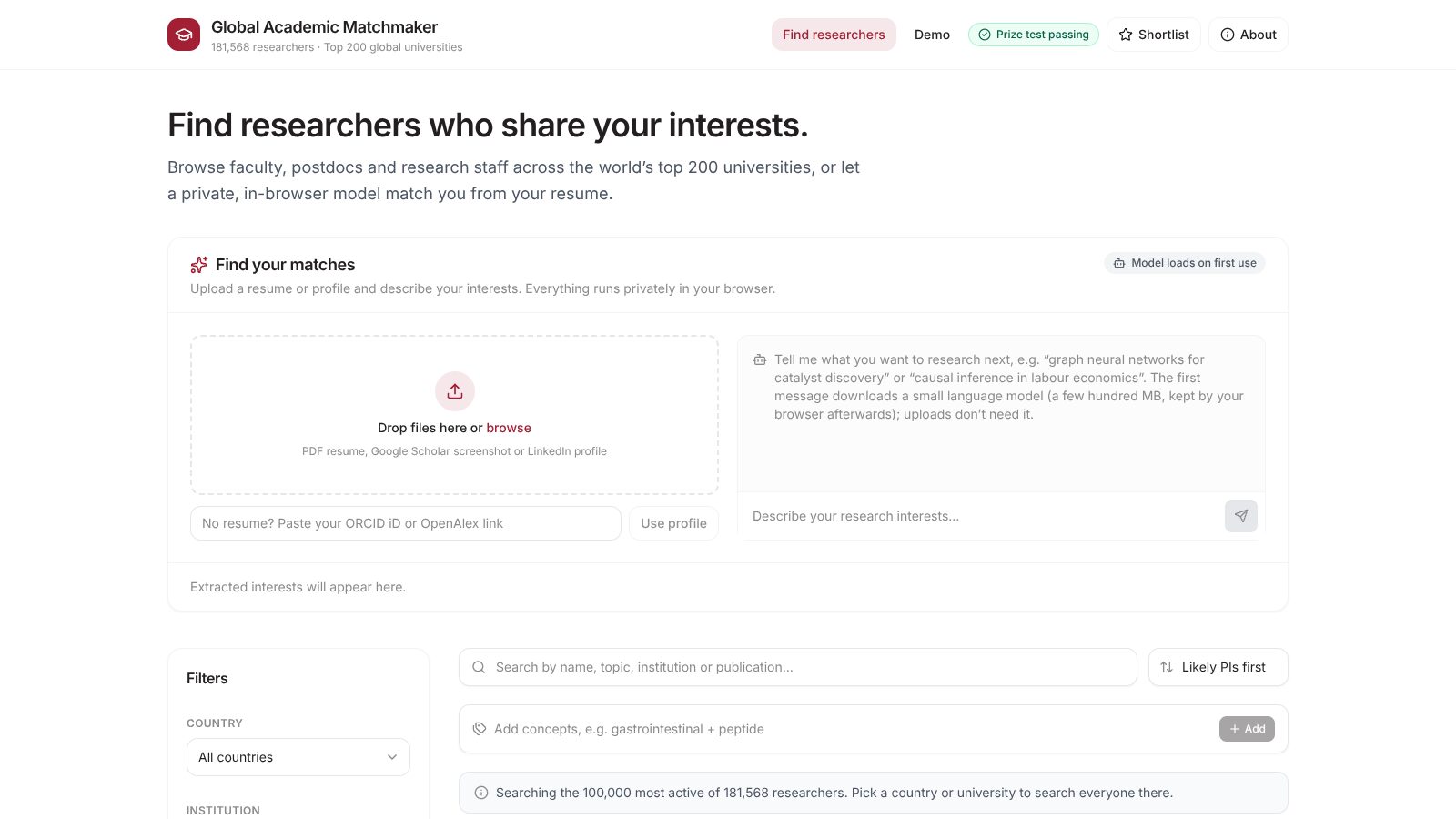
Finding a PhD or postdoc advisor works roughly the way it did twenty years ago. You open a university's faculty page, read through a few hundred names, open the ones that sound close, skim their recent papers, and repeat for the next university. Twenty universities in, you have a spreadsheet, a headache, and no idea whether the best fit for your work was at the twenty-first.
The information to do better is public. OpenAlex indexes hundreds of millions of papers with author and institution links. ORCID records list people's current roles. University directories list emails. What is missing is a tool that puts it together and answers one question: whose recent research is closest to mine?
Two constraints that shaped everything
I set two rules before writing code.
Your CV never leaves your device. A CV is personal. People upload drafts, unpublished work and contact details. A matching service that collects them is a liability for the person running it, and asking students to trust it is a big ask. So text extraction, the language model and the ranking all run in the visitor's browser.
No servers. The site is static files on GitHub Pages. The data is rebuilt by GitHub Actions on a schedule and published to a Hugging Face dataset, which serves it over a CDN. Nothing runs between those builds, so there is nothing to keep up and nothing to pay for.
Those two rules turn a standard retrieval problem into a constrained one. A typical setup would put the vectors in a database and run a query on a server. Here, the browser has to download whatever it searches, so every byte counts and the index has to be organized for partial loading.
How a match happens
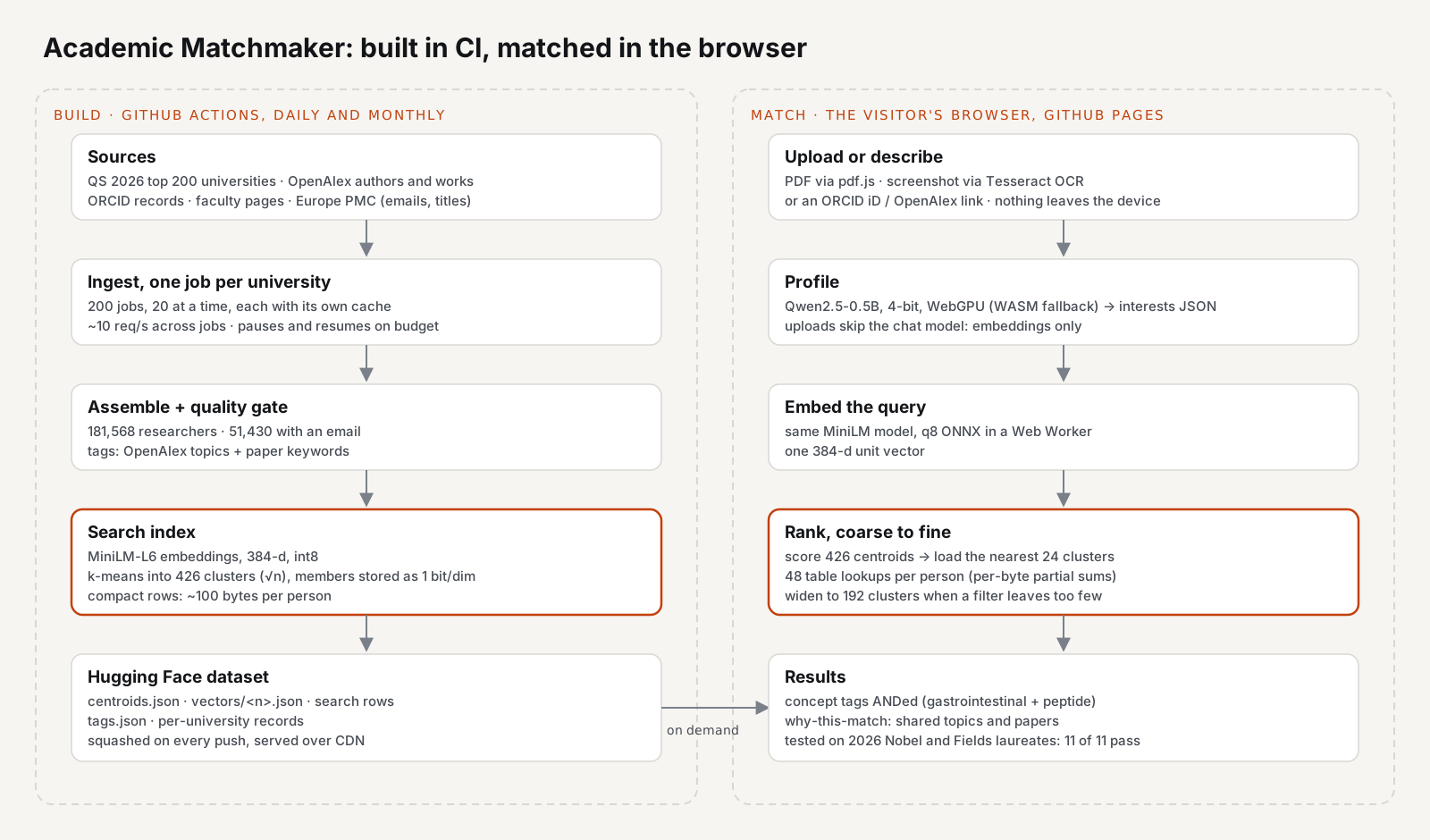
- Read the upload. PDFs go through pdf.js. Screenshots of a Google Scholar or LinkedIn page go through Tesseract OCR. Saved HTML and text are read directly. You can also paste an ORCID iD or OpenAlex link, and the profile is built from public records instead.
- Understand it. A small language model, Qwen2.5-0.5B quantized to 4 bits, runs on WebGPU (with a WebAssembly fallback) and extracts research interests as JSON. Chat messages go through the same model and refine the profile.
- Embed it. The same sentence-embedding model that indexed the researchers, all-MiniLM-L6-v2, turns the profile into one 384-dimension vector.
- Rank, coarse to fine. The browser scores 426 cluster centroids, downloads only the nearest clusters, and ranks the people in them.
- Explain it. Each match shows the shared topics and the closest recent papers, so you can see why someone came up.
Two loading decisions matter for the first visit. The language model is a few hundred megabytes, so it loads only when someone types in the chat box. An uploaded CV skips it entirely and is matched with the embedding model alone. And the vectors load cluster by cluster, so a search touches a few percent of the index, not all of it.
What it covers today
The build pipeline now indexes 181,568 researchers across the top 200 universities in the QS 2026 rankings, and 51,430 of them have an email that matches their name and their university's domain. The data refreshes monthly, with new papers and citations pulled from OpenAlex.
A fixed test set keeps the matching honest. It holds the 2026 Fields Medal and Nobel Prize winners. After every data refresh, the pipeline builds a profile for each of them from their public record (and from a saved CV where one exists), runs it through the same matcher the site uses, and checks the results. The last run passed 11 of 11. The site shows a "Prize test passing" badge only when that holds.
Why this is worth writing up
The interesting part is not the interface. It is the series of decisions that made a 181,568-person index searchable on a phone without a server:
- splitting the pipeline into one job per university so it fits a free API budget and resumes when it hits the limit,
- storing search rows at about 100 bytes a person instead of 500,
- storing each vector in 48 bytes instead of 1,536, and scoring it with 48 table lookups,
- clustering the index so a search downloads a few hundred kilobytes, not hundreds of megabytes,
- and adding concept tags when pure semantic similarity started matching people on generic words.
Part 2 covers the data pipeline and storage. Part 3 covers matching, the tags and the test set.